Add network devices
Network devices are switches, routers, media converters, modems, etc.
Network devices can be added both manually and automatically.
Автоматический поиск
Before automatically searching for network devices, you should add SNMP Credentials.
- Зайти в пункт меню Устройства→Автоматический поиск.
- Нажать кнопку «начать».

- Enter scanned networks, select credentials, and set the number of threads you need to search.

Note
Note that the timeout values and number of Attempts at SNMP connections will be taken from Global Settings.
- Click the “start” button and wait for the search for network devices to end.

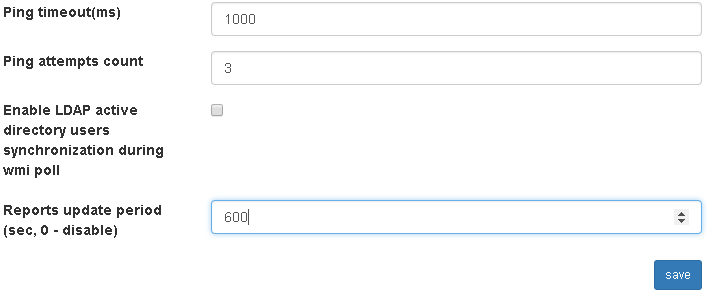
- Go to Settings → Global Settings. Set the “Reports update period” option to the desired value (for example, 600 seconds).
Note
After setting the option, every 600 seconds network devices will be polled to get mac, arp, neighbor tables and reports will be generated.
Note
It is possible to update reports manually. To do this, go to the menu item Reports → Network → update.

Note
Please note that by default the network report will display records with mac addresses found only on NOT_TRUNK ports.
Ручное добавление
Before manually adding network devices, you should add Locations и SNMP Credentials.
- Go to the menu item Devices → Network devices → Add. Enter the snmp credentials and click save.

Click the add button. Fill in the fields and click save.
- Имя (опционально, если задан ip адрес)
Network device name
- Ip адрес (опционально, если задано имя; обязательно, если требуется опрос по snmp)
Network device ip address
- Модель
Модель устройства.
Note
На данный момент доступны следующие модели устройств:
- CISCO – сетевые устройства фирмы Cisco;
- HP1900/2900 – коммутаторы фирмы Hewlett Packard 1900, 2900 серий;
- HP7500 – Hewlett Packard 7500 series switches, without support of collection of IPv6 neighbor tables;
- DLINK - коммутаторы фирмы D-Link;
- MIKROTIK - MikroTik network devices, without the support of vlan and neighbor tables, when adding devices of this model, you must include the option “Use records from arp table with unknown vlan to generate a report on the network”;
- Another snmp device is a simple network device that will be interviewed by SNMP protocol only to collect the following snmp parameters: sysName, sysObjectId, sysDescr, uptime;
- Another non-snmp device is a simple network device that will not be snmped by protocol. Example: media converter.
Note
If your network device is not supported, read Add unsupported network device
- Учетные данные
The credentials that are used to survey a network device.
- Use records from arp tables with unknown vlan to generate a network report
If you’re looking at arp records of this device’s vlan id table everywhere is “-1” (unknown vlan), but you want ip address entries to be present in the network report, you need to include this option. We recommend using this option for MikroTik devices.
- Use arp chart entries with mismatched vlan to generate a network report
If you’re looking at arp records of this device,’ vlan id doesn’t match the vlan id in mac tables, but you want ip address entries to be present in the network report, you need to include this option. Using this option is not recommended, instead it is recommended to reconfigure network devices so that vlan id in arp and mac tables coincides.
- Use records from a neighbor table with an unknown vlan to generate a network report
Similar to the option “Use records from arp table with unknown vlan to generate a report on the network,” only for ipv6 neighbor tables.
- Use entries from a neighbor table with a mismatched vlan to generate a network report -
Similar to the option “Use records from arp table with mismatched vlan to generate a report on the network,” only for ipv6 neighbor tables.
- Инвентарный номер (опционально)
Инвентарный номер.
- Серийный номер (опционально)
Серийный номер.
- Описание (опционально)
Описание.
- Группы (опционально)
Группы, в которые входит сетевое устройство.
- Здание
Здание, где размещено сетевое устройство.
- Этаж
Этаж, где размещено сетевое устройство.
- Помещение
The room where the network device is located.
- Шкаф или место.
The cabinet or the place where the network device is placed.
- Положение в шкафу (для шкафа)
Положение в шкафу.
- Начальный unit (для шкафа)
Начальный unit.
- Конечный unit (для шкафа)
Конечный unit.


Note
It is possible to test the availability of a device via snmp. To do this, when adding a device, you must click the button “test snmp”.
- Проделать пункт 1 для всех сетевых устройств.

Note
Если устройства отличаются только ip адресом и положением, то вместо добавления устройства, можно копировать уже существующее изменив ip адрес и положение, для этого при добавлении устройства нажать «сохранить и копировать».
- Go to Settings → Global Settings. Set the “Reports update period” option to the desired value (for example, 600 seconds).
Note
After setting the option, every 600 seconds network devices will be polled to get mac, arp, neighbor tables and reports will be generated.
Note
It is possible to update reports manually. To do this, go to the menu item Reports → Network → update.
Note
Please note that by default the network report will display records with mac addresses found only on NOT_TRUNK ports.